Where Is JetBrains AI Heading?
Central CLI, Air, and the Agentic Development Stack


AI coding tools are usually compared as if they were interchangeable chat boxes: Which model scores higher? Which agent edits more files? Which subscription is cheaper?
JetBrains appears to be asking a more architectural question: What has to surround an agent before it can become a dependable part of software delivery?
The answer emerging across JetBrains AI Assistant, the Agent Client Protocol (ACP), the Model Context Protocol (MCP), JetBrains Central CLI, JetBrains Context, Air, and Central Console is not one super-agent. It is a stack of separable layers:
a place where developers work;
one or more agents that plan and execute;
protocols that connect agents, clients, and tools;
repository intelligence that improves retrieval;
routing, identity, credits, policy, and analytics;
verification and human review across the entire system.
That direction matters because teams do not merely need another way to generate code. They need a way to let developers choose agents without rebuilding every integration, let agents reach useful tools without receiving unlimited authority, and let an organization understand cost without pretending that cost telemetry proves code quality.
This article develops that model from an engineer's perspective. It explains which component solves which problem, shows how the pieces interact, and proposes a practical adoption plan with explicit boundaries and measurable exit criteria.
Snapshot date: September 7, 2026. JetBrains is shipping these products at different maturity levels. Air is currently a Public Preview, Central CLI and JetBrains Context are Early Access offerings, and several Central governance capabilities continue to evolve. Verify the linked product documentation before making production, licensing, or compliance decisions.
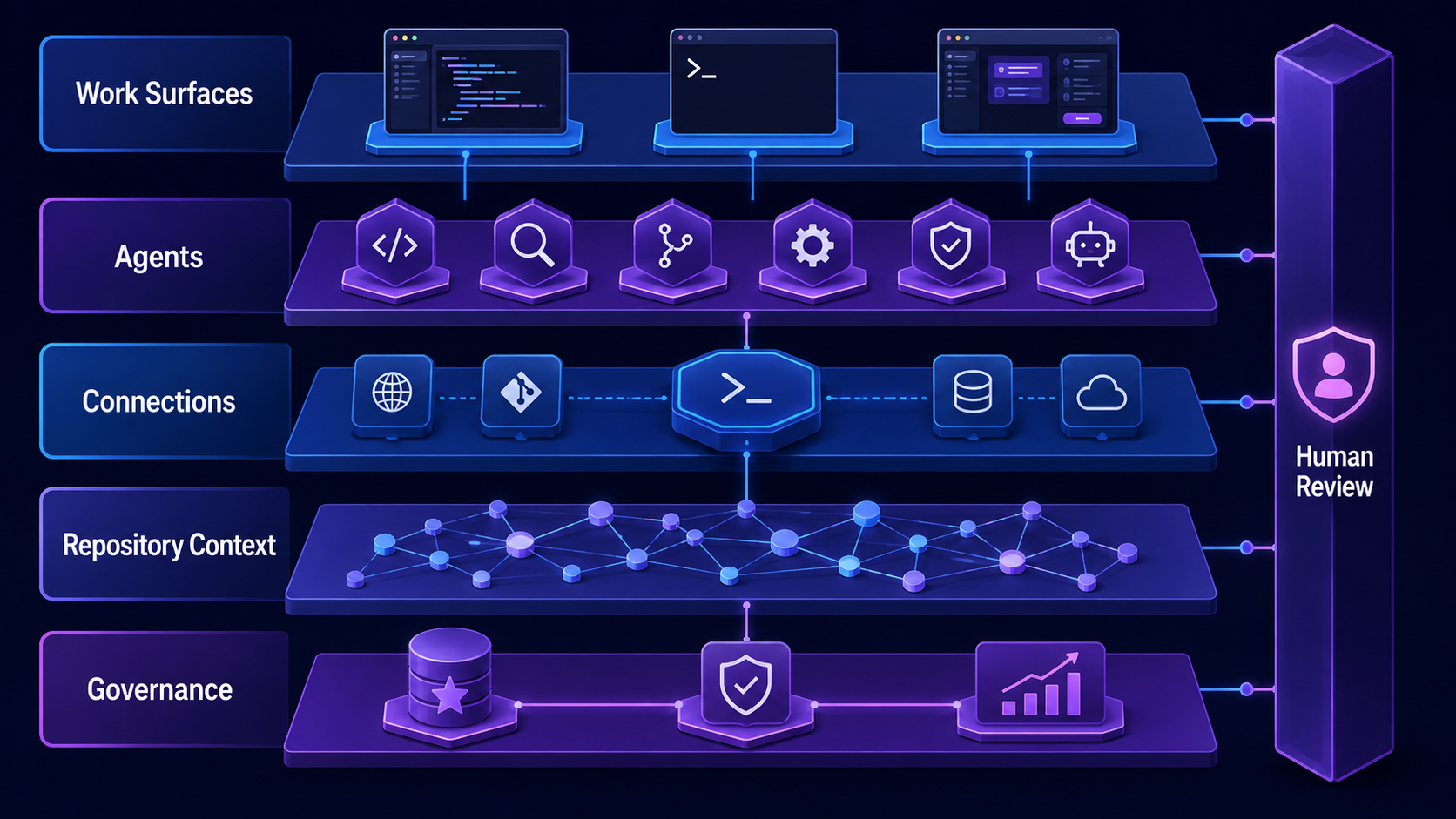
A useful mental model is a layered stack, not a single AI product. Human review is a cross-cutting control, not the final box in a linear pipeline.
The thesis: connection, not replacement
The most important point is easy to miss: these products do not replace one another.
AI Assistant remains the in-IDE surface for chat, completion, edits, and integrated agents. ACP lets an IDE or another client communicate with external coding agents. MCP lets an AI application call external tools and access data. Central CLI routes supported terminal agents through JetBrains Central. JetBrains Context supplies semantic repository retrieval. Air provides an agent-first workspace for parallel tasks and review. Central Console supplies organization-level access, credits, and analytics.
The boundaries can be summarized like this:
| Component | Primary job | What it is not |
|---|---|---|
| AI Assistant | In-IDE assistance and agent access | An organization-wide CLI traffic plane |
| ACP | Agent-to-client interoperability | A tool/data protocol or billing system |
| MCP | Model access to tools and data | An agent UI or orchestration product |
| Central CLI | Routing supported terminal agents through Central | A replacement coding agent |
| JetBrains Context | Semantic repository intelligence | A terminal-agent proxy |
| Air | Agent-first task, workspace, and review experience | A traditional IDE replacement for every workflow |
| Central Console | Access, credit controls, and analytics | Proof that generated code is correct |
This separation is healthy. A team can adopt one layer without accepting every other JetBrains product. A developer might use Codex in a terminal through Central CLI, query repository knowledge from JetBrains Context, and still review the patch in IntelliJ IDEA. Another team might use Air with its own provider credentials and an ACP-compatible agent. The architecture is valuable precisely when these combinations remain possible.
A six-layer model for the JetBrains agentic stack
The diagram above compresses the system into six concerns. They are worth examining separately because each has different failure modes, owners, and maturity requirements.
1. Work surfaces: IDE, terminal, and agent cockpit
The work surface is where a human starts, steers, and reviews a task.
For short, code-local work, the IDE is still difficult to beat. AI Assistant can combine a prompt with the active file, selection, diagnostics, navigation, and the rest of the IntelliJ code model. JetBrains documents integrated agents as separate execution choices and also supports external agents through ACP in AI Assistant.
The terminal optimizes for composability. Developers can pipe data, reuse shell state, run an agent over SSH, or embed commands in scripts. Central CLI deliberately preserves that interface: after an agent is wired, the developer still invokes claude, codex, or gemini in the usual way. The route changes; the working habit does not.
Air addresses a different problem. JetBrains describes it as an agentic development environment where developers can run multiple agents concurrently, isolate tasks in containers or Git worktrees, provide precise code references, and review changes in repository context. The important distinction is not "IDE versus no IDE." Air places the task and the agent at the center, while a traditional IDE places the editable codebase at the center. JetBrains explicitly positions the two as complementary in the Air Public Preview announcement.
Choose the surface according to the dominant interaction:
use the IDE when you are coding and occasionally delegate;
use the terminal when you need composability, remote operation, or an existing CLI workflow;
use Air when you are supervising several agent tasks and comparing their results.
2. Agent layer: execution remains plural
JetBrains is not betting that one agent will win every workload. AI Assistant and Air expose multiple agents, and the exact list is already changing. That is a realistic response to a fast market: model quality, price, latency, context behavior, and enterprise approval can all change faster than an IDE release cycle.
Agent plurality creates two engineering requirements.
First, tasks must have portable acceptance criteria. "Make this better" depends heavily on the agent's habits. A task such as the following is much easier to compare:
Refactor the retry policy behind the PaymentGateway interface.

Constraints:
- Preserve the public API.
- Do not modify database migrations or deployment manifests.
- Retry only idempotent operations.

Done when:
- Existing unit and integration tests pass.
- New tests cover timeout, 429, and non-retryable 4xx behavior.
- The patch introduces no new static-analysis warnings.
- A human reviewer approves the behavior and failure messages.
Second, teams must measure the whole run, not only the model call. The useful unit is an accepted engineering outcome: agent time, human attention, retries, tool failures, CI results, review findings, and cost. A model that is 30% cheaper per token but requires two rescue attempts may be the expensive choice.
3. Connection layer: ACP, MCP, and Central CLI solve different problems
The acronyms are similar enough to cause confusion, so use a simple test:
ACP connects a coding agent to a client such as an IDE or Air.
MCP connects an AI application to tools and data.
Central CLI connects supported terminal-agent traffic to JetBrains Central.
ACP standardizes communication between editors and coding agents, much as the Language Server Protocol standardized editor-to-language-server integration. A local ACP agent can run as a subprocess and communicate over JSON-RPC through standard input/output. The protocol includes agentic UI concepts such as session updates, tool calls, permissions, and diffs. That lets a client present an agent's activity without implementing a proprietary integration for each agent.
MCP faces the other direction. A model or agent needs access to issue trackers, databases, browsers, build services, internal APIs, or IDE operations. JetBrains AI Assistant can connect to MCP servers, and JetBrains documents both user configuration and centrally managed server availability in its MCP guide.
Central CLI is neither of those protocols. It is a routing proxy. The official Central CLI quickstart currently lists Claude Code, Codex, and Gemini CLI as supported wiring targets. It updates the agent's configuration so requests go through a local Central proxy, which then handles JetBrains authentication and routing to the cloud service.
These three mechanisms can coexist in one task:
Developer
  -> Air or an IDE
     -> ACP
        -> Coding agent
           -> MCP
              -> IDE tools, issue tracker, CI, documentation

Developer
  -> terminal agent command
     -> Central CLI local proxy
        -> JetBrains Central routing, credits, and telemetry
The first flow is about interaction and capabilities. The second is about traffic routing and management. Conflating them leads to incorrect security reviews. An agent can be beautifully integrated through ACP yet bypass Central CLI billing. An agent can be wired through Central CLI yet still have dangerously broad MCP tools.
4. Knowledge layer: repository context is a retrieval system
Agents spend a surprising amount of their budget rediscovering the codebase: searching for symbols, opening nearby files, locating an implementation pattern, and tracing dependencies. Larger context windows help, but loading more files is not the same as finding the right files.
JetBrains Context adds a semantic repository index for agents including Claude Code, Codex CLI, and Junie CLI. It is intended to work across JetBrains IDEs, Air, VS Code, and other supported environments. JetBrains reports reductions of up to 68% in agent turns, 59% in latency, and 48% in execution cost across its evaluation sets. Those are vendor-reported maxima, not guarantees; reproduce them on your own repositories before building a business case.
The privacy details deserve more attention than the headline numbers. Current JetBrains Context documentation says source chunks are sent to the service during indexing, where embeddings are computed and stored along with file paths, offsets, and repository and revision identifiers. Raw source is not stored as raw source; searches return coordinates, and the local client opens the corresponding code. The same documentation describes jbcontext remove-index for deleting indexed data.
For an enterprise review, "raw source is not stored" is only the beginning. Ask:
Which repositories may be indexed?
Are generated files, secrets, fixtures, and regulated data excluded before chunking?
Which identities can query which repository indexes?
How quickly do access revocation and index deletion take effect?
Can the organization audit indexing, searches, and cross-repository retrieval?
What happens when repository permissions differ from Central permissions?
Repository intelligence is powerful because it can cross local checkout boundaries. That same capability makes authorization correctness non-negotiable.
5. Management layer: shared credits and visibility
Once developers use several agents across IDEs, terminals, and Air, per-vendor dashboards stop answering basic questions. Who used the capacity? Which agent drove a spend spike? Did a trial create accepted patches or merely more messages?
Central Console attempts to provide one control and reporting plane. Its current AI management documentation covers AI-enabled licenses, included quota, top-up credits, and per-user limits. The AI Credits consumption report aggregates supported-agent usage across AI Assistant, Central CLI, and Air.
The Session Explorer is especially useful - and easy to overinterpret. It can show attributable sessions with user, agent, model, duration, tokens, and credits. But JetBrains explicitly documents important gaps: updates are batched rather than real time; non-agentic AI Assistant features are excluded; and the explorer currently does not show MCP tool usage or repositories accessed per session. Read the limitations in the Session Explorer documentation before treating it as a complete audit trail.
This produces a clean responsibility split:
| Question | Best evidence |
|---|---|
| What did the run cost? | Credit and token telemetry |
| Which agent/model ran? | Attributable session metadata |
| Which files changed? | Git diff and worktree history |
| Which tools were called? | Agent and MCP audit logs |
| Is the patch correct? | Tests, static analysis, runtime checks, and review |
| Was the action authorized? | Identity, policy decision, approval, and tool logs |
Cost visibility is necessary governance. It is not quality assurance.
6. Verification and review: the vertical safety rail
The final layer should not sit at the bottom of the stack. Verification must cross every layer:
the surface should show the real diff and relevant diagnostics;
the agent should expose progress, tool calls, and permission requests;
the connection layer should preserve identity and auditability;
repository retrieval should respect authorization and revision boundaries;
management should report costs without obscuring execution evidence;
humans should make high-impact decisions with reproducible evidence.
This is why Air's emphasis on worktrees, containers, contextual diffs, and review is more significant than its visual design. Parallelism without isolation creates conflicts. Isolation without an understandable review path creates abandoned patches. Review without tests becomes aesthetic approval.
Use the following loop as the minimum viable agent workflow:
inspect -> propose -> change -> test -> observe -> review -> accept or revise
The loop should end on evidence, not on the agent saying "done."
Central CLI in practice: keep the workflow, change the route
Central CLI is the most immediately testable part of the stack because it is deliberately narrow. The current quickstart is essentially:
# Download, inspect, and run the installer according to your security policy.

central login
central add claude
central add codex
central add gemini

central status
central quota
After wiring, the normal commands remain normal:
claude "explain this module"
codex "refactor this function"
gemini "review this change"
Under the hood, Central CLI runs a local proxy. JetBrains' troubleshooting documentation identifies port 19515 for the OAuth callback and 19516 as the default proxy port. It also shows that wiring changes each agent's provider or base URL configuration. That detail has four operational consequences.
Treat wiring as a configuration change
Before a pilot, record the existing agent configuration and provider behavior. After wiring, verify the expected base URL without printing the embedded secret. Run central status, open a fresh terminal, and execute a harmless read-only task. If you later remove the pilot, verify that the original provider route is restored rather than assuming an uninstall reverted configuration.
Detect route bypass
A dashboard can only govern traffic that passes through its route. Environment variables, per-project configuration, a container image, or an alternate binary may silently bypass the local proxy. Build a canary check that confirms the effective provider host for each managed agent while redacting credentials.
Separate availability from agent correctness
If the local proxy is down, the agent may fail even when the upstream provider is healthy. Central CLI's troubleshooting guide recommends checking proxy status, opening a new terminal after configuration changes, and inspecting the agent's effective configuration. Monitor the proxy as a dependency; do not label every connection failure "the model is down."
Review the data path and terms
The Central CLI EAP terms state that cloud-routed use can transmit prompts, outputs, and workspace metadata through JetBrains services and downstream AI providers, while BYOK behavior has its own direct-provider path. They also place responsibility for generated output and local autonomous actions on the user. The exact legal and technical wording can change, so security and legal reviewers should use the current Central CLI EAP agreement and service-provider list rather than a slide or blog summary.
Air is a parallel-work system, not just another chat UI
Air's useful abstraction is the task workspace. A task can run locally, in a Git worktree, or in an isolated container, while the human switches to another task. This makes parallel development visible without requiring one terminal window per agent.
The design suggests a practical operating model:
One task, one isolated workspace. Do not let three agents edit the same checkout.
One explicit goal. A task should have a narrow output and executable acceptance checks.
One evidence bundle. Preserve the diff, test results, diagnostics, and material tool activity.
One accountable reviewer. Parallel work still needs a named human decision maker.
Merge through the normal path. Agent output should enter the same branch protection and CI gates as human output.
ACP is what makes the agent selection less tightly coupled to the surface. JetBrains and Zed designed ACP so a compatible client can talk to a compatible agent without a unique integration for every pair. Air now supports additional ACP-compatible agents and local-model arrangements, as described in JetBrains' July 2026 Air update.
Protocol compatibility, however, is not behavioral equivalence. Agents may expose different permission modes, context limits, resumption semantics, tool capabilities, and model choices. Pin ACP and agent versions during a pilot, test reconnect and cancellation behavior, and do not assume that a green "connected" indicator guarantees equivalent safety controls.
A practical two-week evaluation
The wrong pilot asks each agent to build a toy application. The right pilot samples work from your real backlog and freezes the acceptance criteria.
Days 1-2: define boundaries and baselines
Choose 12-20 tasks across four categories:
deterministic maintenance, such as a rename or dependency update;
repository investigation, such as locating a production failure path;
feature work with integration tests;
review or documentation work that requires broad context.
For each task, record a recent human-only baseline if one exists. Define repositories, branches, commands, external systems, data classifications, and actions that are allowed. Production deploys, external messages, credential changes, destructive operations, and security disclosures should normally remain approval-gated.
Days 3-7: compare surfaces and routes
Run the same task categories through the IDE, a terminal agent, and Air where appropriate. Do not force every task through every surface; the goal is to discover fit, not crown a universal winner.
Track:
verified_success_rate = accepted_tasks / attempted_tasks
attention_saved       = baseline_human_minutes - review_and_rescue_minutes
cost_per_accept        = total_credits_or_cost / accepted_tasks
false_completion_rate = failed_acceptance_checks / agent_claimed_completions
unsafe_action_rate     = policy_violations / attempted_tasks
Also record time to first useful diff, tool-call failures, test flakiness, merge conflicts, reviewer comments, and rollback effort. A task that succeeds only after the reviewer rewrites half the patch is not an agent success.
Days 8-10: evaluate repository intelligence
Select tasks that require cross-module or cross-repository discovery. Run them with and without JetBrains Context where practical. Measure files opened, search steps, agent turns, latency, cost, missed dependencies, and architecture conformity.
Do not test only happy paths. Include renamed symbols, duplicated implementations, stale documentation, generated code, and a repository the user is not authorized to query. Retrieval quality and access-control behavior matter together.
Days 11-14: test governance and recovery
Create controlled failures:
stop the Central CLI proxy;
expire or revoke a test credential;
exhaust a small test credit limit;
deny an MCP permission;
cancel an Air task halfway through;
create a merge conflict in an isolated worktree;
remove a user's repository access and verify retrieval behavior.
Then ask whether developers can diagnose the issue without an administrator, whether administrators can attribute cost, whether security can reconstruct significant actions, and whether the team can return to its original provider route.
The outcome of the pilot should be a decision per workflow, not a single adoption percentage.
What JetBrains still has to prove
The architecture is coherent, but architecture diagrams do not eliminate product risk.
Interoperability needs conformance, not just support badges
ACP can reduce integration cost, but the ecosystem needs reliable version negotiation, cancellation, permission semantics, resumption, diff fidelity, and remote-agent behavior. The ACP specification and SDK are active projects. Enterprises should pin versions, maintain a small conformance suite, and treat draft protocol surfaces as changeable.
Governance needs deeper execution evidence
Credits and attributable sessions answer financial questions. They do not yet form a complete agent audit trail. JetBrains documents that Session Explorer does not currently expose MCP calls or repository access. Closing that gap - while controlling the sensitivity and retention of logs - will determine whether Central becomes a true engineering control plane or mainly a billing and adoption dashboard.
Repository intelligence needs transparent authorization
Cross-repository semantic search can save enormous time, but it must preserve repository-level identity, revision, and revocation semantics. Teams will need evidence that the retrieval layer cannot surface coordinates, paths, or patterns from repositories a user cannot access.
Parallelism needs merge economics
Running five agents is easy. Reviewing five overlapping patches is not. Air's worktree and review model is promising, but teams should measure conflict rate, reviewer queue time, abandoned-task rate, and accepted value per task - not the number of simultaneous sessions.
Open choice must survive commercial pressure
The strategic promise is agent and model choice with a shared management plane. That promise remains credible only if developers can change agents without losing essential context, permissions, observability, or cost controls, and if BYOK and managed-credit routes stay understandable.
My take: JetBrains is building the connective tissue
JetBrains' advantage is not that it can place another model behind an IDE chat window. Many vendors can do that.
Its stronger position is the connective tissue accumulated from decades of developer tooling: code models, navigation, diagnostics, refactoring, test integration, version control, workspaces, and now protocols, repository retrieval, and organization management. If JetBrains can expose those capabilities to multiple agents while keeping the human in a high-quality review loop, it can make the surrounding system more valuable than any single model subscription.
The emerging stack therefore looks less like a new IDE and more like an operating system for agentic development:
AI Assistant is the in-editor entry point;
ACP makes agent clients and agents interchangeable enough to evolve independently;
MCP gives agents controlled access to useful capabilities;
Central CLI brings supported terminal traffic into a managed route;
Context gives agents a repository memory layer;
Air turns parallel agent work into visible, reviewable tasks;
Central Console gives organizations a place to manage access and economics;
tests, isolation, logs, and human review decide whether the output is trustworthy.
That final line is the important one. No connection layer makes an agent correct. No dashboard makes a patch safe. No semantic index replaces authorization. No parallel workspace removes the cost of review.
Start with one bounded workflow. Keep the acceptance criteria executable. Route only the traffic you can verify. Grant the smallest useful tool surface. Measure accepted outcomes instead of generated tokens. Expand the blast radius only after the evidence says the system has earned it.
That is where JetBrains AI appears to be heading: not toward one agent that owns the entire workflow, but toward a stack in which developers can choose agents, organizations can govern the route, and humans can still understand and approve what reaches the codebase.