Manus in 2026: An Engineer's Guide to the Always-On AI Workspace
What changed after Manus 1.6, how its three execution environments fit together, and where human approval still matters


In January 2026, I published a deep dive into Manus. At the time, the interesting question was whether an AI agent could move beyond answering questions and complete a multi-step task inside its own cloud environment. Manus 1.6 Max, Wide Research, full-stack and mobile development, Design View, and the first generation of Scheduled Tasks made a strong case that it could.
Eight months later, that framing is no longer sufficient.
The most consequential Manus updates are not simply improvements to model quality. They change where work runs, what state survives, how an agent reuses team knowledge, when it may act without confirmation, and how generated software remains operational after the first build. Manus now spans temporary cloud machines, a user's local computer, persistent cloud infrastructure, project-scoped skills, external services, recurring execution, and native business artifacts.
That makes the current engineering question more demanding:
Has Manus become an always-on engineering workspace, rather than an agent that completes isolated tasks?
The answer is qualified. The product now contains many of the components of such a workspace. But those components do not erase the engineering responsibilities around permissions, state, observability, backup, failure recovery, and cost. They move those responsibilities to new boundaries.
This article maps those boundaries as of September 8, 2026. It separates documented product behavior from the operational claims that teams should still validate themselves.
The January baseline has changed
The January article described Manus as an autonomous agent with a planning layer, an execution core, and access to tools such as a browser, shell, and file system. That model remains useful, but it assumes that the main unit of work is a task: the user supplies a goal, Manus creates a plan, the agent executes it, and the user receives an artifact.
The 2026 releases added several longer-lived units around that task:
an execution environment that can survive across tasks;
a local execution path into the developer's own machine;
project instructions and reusable Skills;
schedules that return to an existing context;
connectors that can update external systems, rather than merely read them;
hosting and publishing workflows that continue after generation;
explicit planning, branching, approval, and rollback controls.
There is also an important corporate correction. My January article discussed Manus after Meta's December 2025 acquisition. Manus subsequently announced its separation from Meta and a backup-and-restoration process for affected users, and on September 1 announced that it had formally resumed independent operations. The earlier article remains a snapshot of its publication date, but its Meta-era assumptions should not be projected onto the current product.
Start with the execution environment
The cleanest way to understand modern Manus is to stop thinking of it as one computer. It now exposes three materially different execution environments.
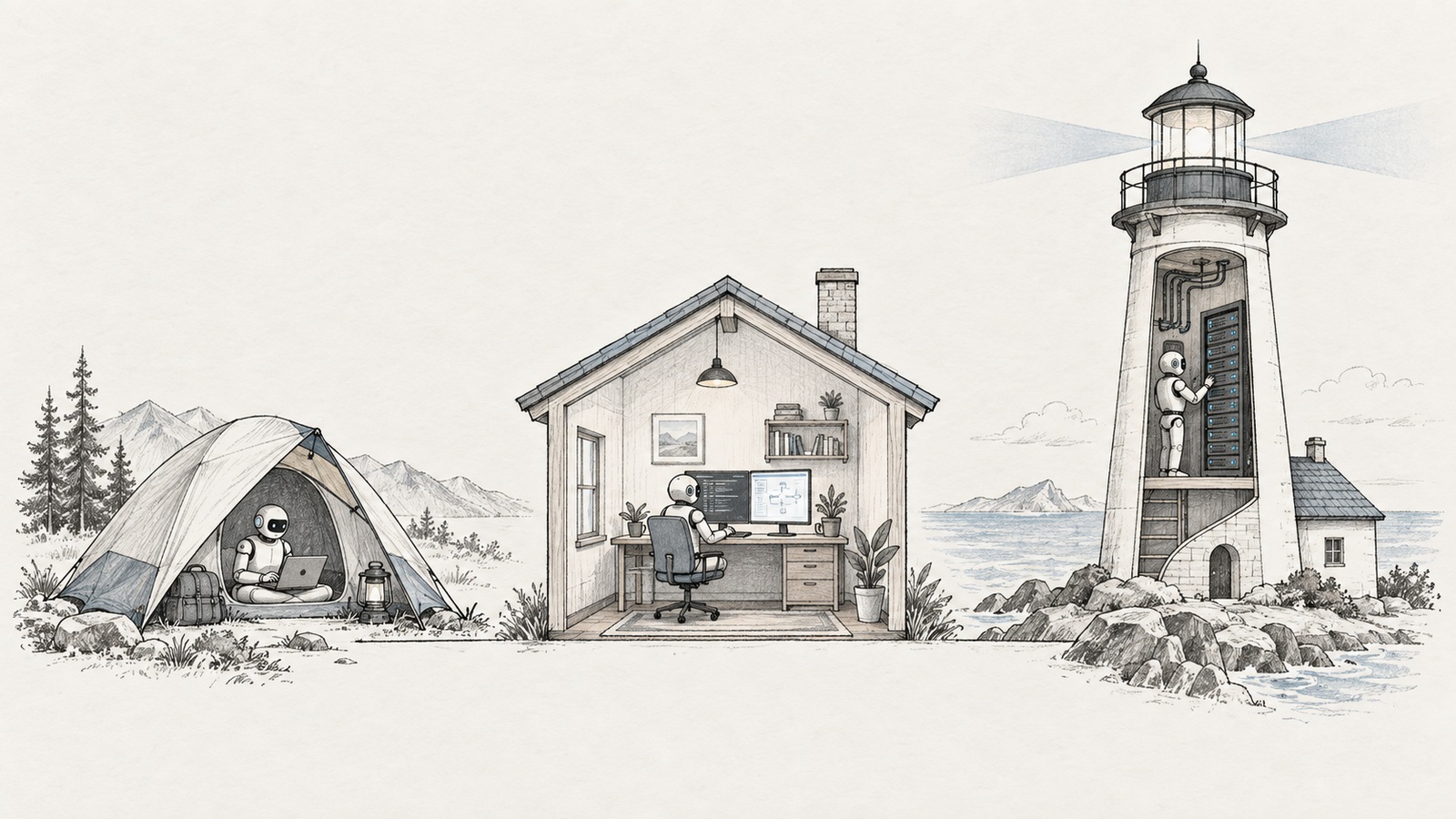
| Environment | State model | Best fit | Primary dependency | Main operational concern |
|---|---|---|---|---|
| Temporary Sandbox | Task-scoped and recyclable | Research, code generation, analysis, documents, short builds | Manus-managed virtual machine | Intermediate files may disappear after recycling |
| My Computer | Persistent because it is your machine | Local repositories, desktop apps, local toolchains and hardware | Your computer must be available and authorized | The agent can affect real local data |
| Cloud Computer | Persistent and designed to remain online | Bots, scheduled jobs, databases, APIs and self-hosted tools | Paid cloud capacity and remote credentials | Backup, patching, secrets, uptime and lifecycle ownership |
Choosing among these is an architecture decision. A prompt that asks Manus to “run this every morning” is incomplete until the team decides where the executable, state, credentials, logs, and outputs will live.
Temporary Sandbox: disposable compute with selective restoration
The Manus Sandbox is an isolated virtual machine allocated to a task. It includes networking, a file system, a browser, command-line tools, and the ability to execute code. Separate tasks receive separate environments and can run in parallel.
The important detail is its lifecycle. The Sandbox can sleep and wake without changing its files, but an inactive Sandbox may eventually be recycled. Manus currently documents a seven-day inactive retention period for Free users and 21 days for Pro users. When Manus recreates a recycled Sandbox, it restores uploaded attachments, Manus artifacts, and selected project files, but it does not promise to restore every intermediate script or temporary file.
That distinction should change how an engineer uses it.
Good Sandbox workloads include:
investigating a library and delivering a report;
transforming a dataset into a reviewed spreadsheet;
generating a disposable prototype;
reproducing a bug in an isolated environment;
building an artifact whose source is exported at the end of the task.
A poor Sandbox workload is a service whose correctness depends on an unexported working directory still existing next month.
Treat the Sandbox like an ephemeral CI runner. Export source code, manifests, lockfiles, migrations, and important logs. If an artifact matters, put it in a system with an explicit retention policy rather than assuming the conversational workspace is the system of record.
The same documentation exposes a subtle collaboration boundary. Sharing a task exposes the conversation and output artifacts, while collaboration allows participants to issue instructions that can affect the Sandbox. Manus says connectors are disabled when collaboration is enabled. That is a useful safeguard, but it does not make arbitrary files inside a collaborative Sandbox harmless. A task containing credentials, customer exports, or private source code should be reviewed before collaborators are invited.
My Computer: the trust boundary moves onto your machine
My Computer is part of Manus Desktop. It lets the agent issue command-line instructions on the user's Mac or Windows machine, read and edit authorized local files, and launch or control local applications.
This solves a real limitation of cloud agents. Your working repository, Xcode project, Docker cache, local database, signing configuration, and specialized hardware may not exist in a hosted sandbox. Moving the agent to the repository can be more practical than copying the repository to the agent.
It also makes the blast radius real.
According to Manus, terminal commands require explicit approval. The user may approve once or choose an “Always Allow” path for trusted work. The second option improves throughput, but it is a security decision, not a convenience toggle. The correct question is not whether the agent is generally trustworthy. It is whether a specific command class, in a specific directory, using a specific account, has an acceptable failure radius.
For repository work, I would start with constraints like these:
Work only inside /Users/me/projects/example-app.
Do not read .env, SSH configuration, browser profiles, or keychains.
Before installing software or running a command outside the repository,
show the exact command and explain why it is required.
Do not push, publish, delete branches, or modify cloud resources.
Run tests and produce a diff for review.
Natural-language constraints are not an operating-system sandbox, but they improve reviewability. Pair them with filesystem permissions, least-privilege credentials, version control, and backups.
My Computer is the right environment when the job inherently depends on local state. It is not the right answer for an unattended service unless you deliberately accept the availability of your laptop or dedicate an always-on machine to it. Manus itself notes that remote work depends on the computer being powered on and the Desktop application running.
Cloud Computer: persistence changes the problem
The Cloud Computer is a dedicated, persistent Ubuntu environment designed for continuous operation. Manus positions it for 24/7 bots, databases, scheduled scrapers, APIs, persistent knowledge bases, and self-hosted software such as Metabase or WordPress. Users can access it through SSH or a web terminal, and the product exposes CPU, memory, and storage monitoring.
This is a more important change than another model upgrade. The agent can leave behind a running system, and later tasks can encounter the same files and installed tools. Work no longer has to end when the generating conversation ends.
Consider a dependency-monitoring service:
Create a service that checks the repositories listed in repos.yaml every day.
For each repository, fetch the current dependency lockfile, identify newly
published critical vulnerabilities, and write the results to PostgreSQL.
Send a Slack alert only for a new critical finding.

Before deployment, show me:
1. the architecture and threat model;
2. the database schema and retention policy;
3. every external credential and requested scope;
4. retry, timeout, and deduplication behavior;
5. backup and restore instructions;
6. estimated recurring cost.

Do not enable the schedule or send a message until I approve the plan.
The prompt is intentionally operational. “Build a vulnerability bot” describes a feature. It says nothing about idempotency, alert storms, secrets, backups, or failure recovery.
Persistent compute also creates persistent liabilities. The official Cloud Computer article says that upgrading a plan restarts the virtual machine, running projects pause during that restart, and working files are deleted if the subscription stops, although delivered outputs remain in chat history. It also states that the environment currently has no graphical desktop.
For production-like use, assume that the Cloud Computer is replaceable:
keep application source in version control;
define the environment with a reproducible manifest or container configuration;
store secrets outside the repository and rotate them;
back up databases to a different failure domain;
export audit and application logs;
test restoration, not just backup creation;
document what happens when the subscription, account, or region changes.
Cloud Computer reduces server setup work. It does not abolish server ownership.
Planning and branching turn autonomy into a controlled process
Early agent products optimized for immediate execution. That is impressive in demos and uncomfortable in systems where a plausible but incorrect assumption can produce a schema migration, publish a site, or message a customer.
Manus's newer controls acknowledge this tension.
Plan Mode is an execution gate
Plan Mode expands a request into a Markdown plan containing goals, steps, and constraints. If important context is missing, the agent asks questions. The user can edit the plan directly or ask Manus to revise it.
The key behavior is simple: Manus does not begin the build until the plan is confirmed or dismissed. Plan Mode can also be activated during a task, allowing the user to pause execution and plan the next phase.
For engineering work, the plan should expose decisions that are expensive to discover after implementation:
the data model and migration order;
authentication and authorization rules;
external APIs and credential scopes;
destructive or externally visible actions;
performance and availability assumptions;
deployment target and rollback path;
logging, metrics, and alerting;
acceptance criteria.
Do not approve a plan because it looks detailed. Review it like a lightweight design document. A long plan can still omit the one invariant that matters.
Branch is useful when the uncertainty is architectural
Branch lets users explore multiple directions from a shared context. This is valuable when alternatives should inherit the same requirements and evidence but remain isolated from each other's decisions.
Examples include:
a serverless implementation versus a persistent-service implementation;
row-level security in Supabase versus authorization in an application API;
a minimal internal tool versus a customer-facing product;
a conservative migration plan versus a faster plan with a maintenance window.
The useful output is not two polished mockups. It is a decision record:
## Decision
Choose Branch B: application API owns authorization.

## Why
- centralizes policy enforcement;
- provides a stable audit point;
- avoids exposing database-specific rules to clients.

## Cost
- adds an operational service;
- increases latency;
- requires separate availability monitoring.

## Rejected alternative
Direct client access with row-level security remains appropriate for the
internal prototype, but not for the multi-tenant production design.
Copying and rollback controls complement branching. Branches help before a decision. Copies isolate an experiment. Rollback helps after a change fails. None replaces source control for code you must own outside the platform.
Projects and Skills make process reusable
Execution environments preserve compute state. Projects and Skills preserve working knowledge.
Manus announced support for the Agent Skills open standard, which packages instructions, scripts, references, and assets as filesystem-based resources. The documented design uses progressive disclosure: metadata is available cheaply, the main instructions load when triggered, and supporting resources load only when referenced.
This is attractive to engineers because it turns part of the prompt into a versionable interface. A useful Skill can define:
when it should run;
what inputs it accepts;
which tools it may use;
validation and security checks;
expected output files;
examples of acceptable and unacceptable results.
Project Skills narrow that library to a project. Manus says that only Skills explicitly added to a Project are available there, and teams can lock the set to prevent accidental workflow changes. That reduces the chance that an unrelated personal Skill silently changes a team process.
Projects can now also propose updates from completed conversations. Manus may identify reusable terminology, examples, source files, instructions, or workflow patterns and suggest changes to Project context or Skills. The product documentation is explicit that those changes require user approval.
This should not be described as the model “learning your company” in the machine-learning sense. A more accurate mental model is a governed knowledge-maintenance loop:
a task produces a useful decision or procedure;
Manus identifies a reusable change;
a human reviews the proposed diff;
the Project stores the approved instruction, file, or Skill;
later tasks start with the updated context.
The engineering opportunity is significant, but so is configuration drift. Treat Project instructions and Skills like code. Assign owners, review changes, keep examples, test important workflows, and retain a history that explains why a rule exists.
Scheduled Tasks 2.0 is about context, not only time
The first version of Scheduled Tasks repeated work on a clock. Scheduled Tasks 2.0 adds a second dimension: where the recurring work continues.
A run can return to the same task and reuse its conversation, files, instructions, and results. A schedule associated with a Project can use that Project's files, Skills, connectors, and output conventions. Manus-built web applications can also contain scheduled actions for data refreshes, scripts, reminders, dashboards, or recurring summaries.
The official explanation captures the design change well: “The schedule follows the place where the work lives, not just the time on the calendar.”
That is closer to a stateful workflow engine than a prompt attached to cron. It also inherits familiar workflow-engine failure modes:
a retry duplicates an external action;
stale context changes the meaning of a later run;
a connector token expires;
a partial run updates the database but fails before notification;
the schedule succeeds technically while producing incorrect content;
a long-running task overlaps its next invocation.
Manus exposes run history, upcoming schedules, and options to continue in the same task or create a separate task. It also offers “Skip confirmations” for trusted workflows, including sending, publishing, or posting.
That switch deserves a production review. A read-only morning digest and an automated customer email should not share the same approval policy. Classify scheduled operations by effect:
| Effect | Example | Suggested default |
|---|---|---|
| Read | Collect public release notes | May run unattended |
| Internal write | Update a draft dashboard | Run unattended with history and rollback |
| External write | Modify a CRM record | Require narrow scopes, validation and audit |
| Communication | Send email or Slack message | Draft first or restrict recipients and templates |
| Destructive action | Delete, revoke or overwrite | Keep explicit approval unless a tightly tested runbook exists |
For each schedule, define an idempotency key, retry ceiling, timeout, alert destination, owner, and disable procedure. If the interface does not expose one of these controls, implement it in the workload or treat the gap as an adoption blocker.
Connectors turn context into authority
The growing connector catalog is easy to present as a wall of logos. For engineers, the important distinction is what authority each connector grants.
A connector may allow Manus to:
retrieve information;
update existing data;
create a new artifact;
send or publish something externally.
Those are different risk levels even when they belong to the same service.
The upgraded Google Workspace connector, for example, is documented as supporting precise edits inside Docs, Sheets, and Slides rather than only creating or reading files. Manus describes actions such as replacing text in a specific section, updating speaker notes, duplicating a spreadsheet tab while retaining formulas, and replying to a document comment. The integration uses Google OAuth 2.0 permissions and a Google Workspace CLI that Manus notes is open source but not an officially supported Google product.
The Supabase connector goes further into operational data. Manus says it can query authorized projects, execute SQL, propose and apply schema migrations, deploy Edge Functions, inspect logs, and surface security or performance recommendations. The available actions depend on the Supabase access granted by the user and the Supabase plan.
A safe database prompt should separate proposal from mutation:
Inspect the attached CRM export and the target Supabase schema.
Produce:
- a column mapping;
- rejected-row rules;
- deduplication keys;
- the proposed SQL migration;
- a dry-run report with row counts;
- rollback SQL.

Do not alter the schema or import records until I approve the migration.
After approval, execute inside a transaction where supported, validate counts,
sample the imported records, and save an audit report.
The ElevenLabs integration illustrates a different boundary. Manus documents speech generation, transcription, voice cloning, and voice-enabled application development through an authorized ElevenLabs account. Billing and usage remain governed by that account, and voice cloning carries consent and rights obligations. “The connector worked” is not sufficient acceptance criteria when the output can impersonate a person.
For every connector, capture five facts before automation:
exact OAuth scopes or API permissions;
which resources the authorization covers;
whether the agent can read, write, send, publish, or delete;
where inputs and outputs are processed and retained;
how access is revoked and how revocation affects scheduled work.
The agent's reasoning quality does not compensate for an overprivileged token.
Application generation now extends into operations
The January view of Manus app development emphasized scaffolding and deployment. The newer product surface stretches across a larger lifecycle: planning, code generation, database integration, testing, multiple hosting modes, automatic publishing after changes, analytics, scheduled behavior, and subsequent modification.
This can compress the distance from idea to a running internal tool. It can also conceal ownership questions. A generated application still needs answers to these:
Where is the canonical source repository?
Who owns the domain and DNS configuration?
Where are production secrets stored?
Which component owns authentication and authorization?
Who applies dependency and operating-system updates?
Where are database backups stored?
What telemetry proves the application is healthy?
Can the team rebuild it outside the original Manus account?
The native PowerPoint mode is a smaller but revealing example of the same shift. Manus announced that PowerPoint mode creates .pptx files directly, including editable charts backed by data tables and structured table objects, rather than only converting a web presentation at export time. The July announcement described the feature as Beta for the 1.6 and Max models. Teams should recheck its current availability and still open generated files in PowerPoint to verify fonts, layout, charts, notes, and editability.
The principle is the same for code and documents: generation is not validation.
A reference workflow for governed, continuous operation
The pieces become clearer when assembled into one engineering workflow.
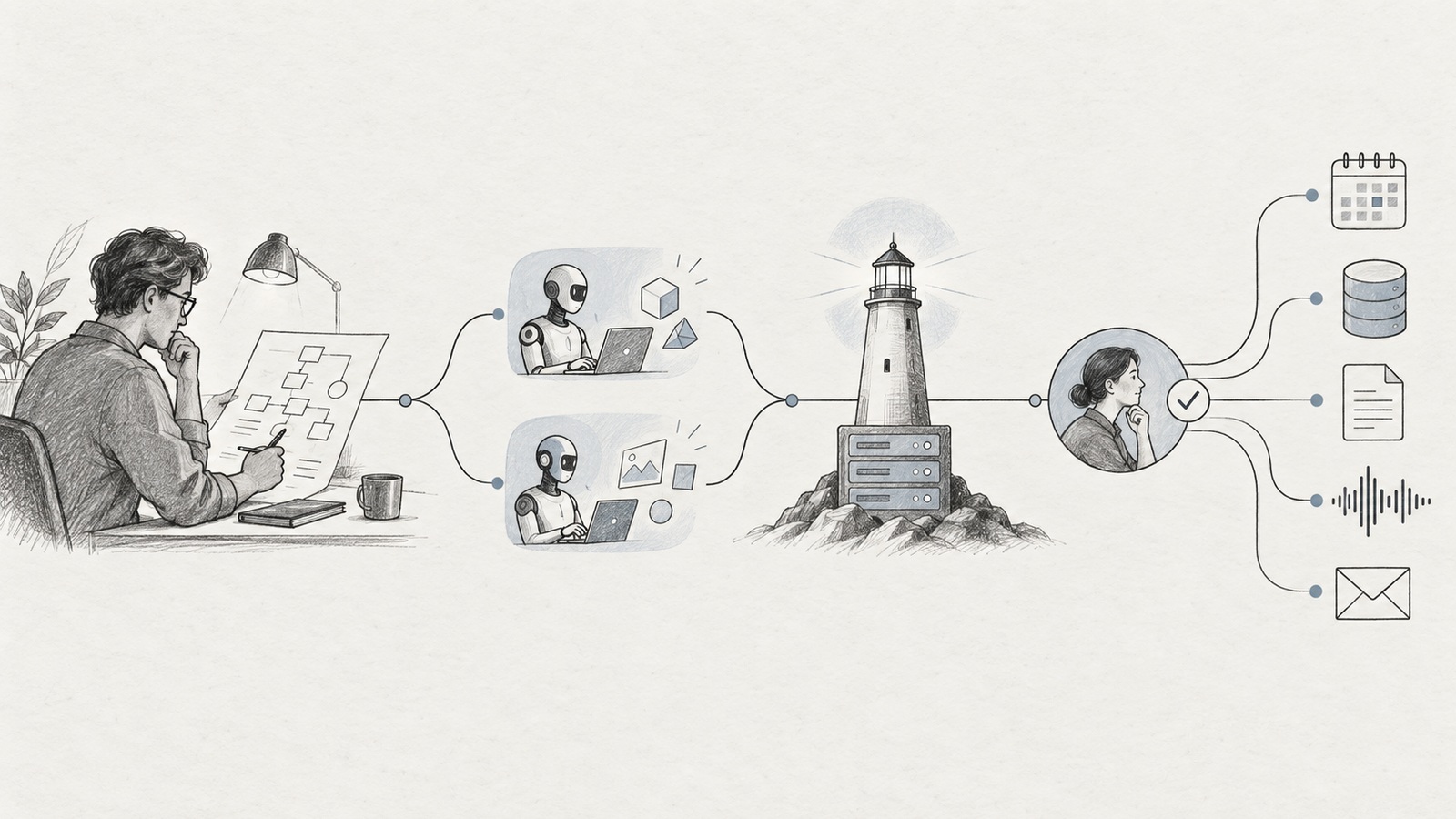
Suppose a platform team wants a daily dependency-risk service.
1. Put requirements behind Plan Mode
Define repositories, severity policy, data sources, scan frequency, false-positive handling, alert recipients, and retention. Require approval before any connector, schedule, database, or outbound message is enabled.
2. Use Branch for the costly uncertainty
Compare a fully managed implementation with a Cloud Computer service. Measure operational control, data retention, portability, and recurring cost. Do not branch merely to produce two visual designs.
3. Select the execution environment explicitly
Use a temporary Sandbox to explore APIs and produce a prototype. Use My Computer only if the scanner must access local repositories or proprietary local tooling. Use Cloud Computer if the approved design needs continuous uptime and persistent state.
4. Package the workflow as a Project Skill
Store source-quality rules, severity thresholds, required report fields, validation steps, and the notification template. Lock the Project Skill after review if consistency matters more than ad hoc customization.
5. Authorize narrow connectors
Grant read access to the required repositories and the minimum Slack capability needed for the approved destination. Separate a credential that reads vulnerability data from one that sends notifications.
6. Add the schedule last
Implement deduplication and dry-run behavior first. Run manually against representative data. Confirm failure alerts and recovery. Only then create the recurring schedule and decide whether confirmations may be skipped.
7. Feed learning back through review
After several runs, ask Manus to propose improvements to the Project instructions or Skill. Review the change as you would review a pull request. Do not let a one-off incident silently redefine the permanent workflow.
This process is less magical than “tell the agent what outcome you want.” It is also much closer to how reliable systems are built.
What I would verify before enterprise adoption
The slide deck that motivated this article ends with constraints to verify. That is the right ending, because many official pages describe capability, not a service-level objective.
I would run a two-week evaluation with evidence in these areas:
Reliability
task completion rate for a fixed suite of representative workflows;
schedule start delay and end-to-end duration;
behavior after transient network, connector, and model failures;
duplicate side effects after retry;
overlapping-run behavior;
recovery after Cloud Computer restart.
State and portability
which Sandbox files survive sleep and recycling;
complete rebuild of a Cloud Computer from versioned configuration;
database backup and restore into a separate environment;
artifact export without access to the originating task;
account and subscription termination behavior.
Security and governance
connector scopes and revocation;
local folder and command approvals in My Computer;
collaboration access to task files;
auditability of external writes;
approval behavior for Plan Mode and scheduled tasks;
secrets exposure in logs, artifacts, prompts, and generated code.
Quality and cost
credits or subscription cost per successful workflow;
human review time, not only agent runtime;
defect rate in code, data changes, and documents;
editability of generated PowerPoint files;
rework caused by incorrect assumptions;
cost of persistent Cloud Computer capacity and external services.
Record the denominator. “Eight tasks succeeded” is weak evidence if the team attempted 30 and manually rescued half of them. Measure successful, reviewable outcomes, not attractive first drafts.
The practical conclusion
Manus in September 2026 is meaningfully broader than the Manus I described in January. It has three execution models, explicit pre-execution planning, parallel branches, reusable and project-scoped Skills, context-aware schedules, connectors with write authority, persistent cloud compute, and richer operational paths for applications and content.
That is enough to call it an AI workspace for continuous operations as a product direction.
It is not enough to assume that every workload placed inside it is production-ready. The platform can generate code, hold state, operate external services, and act on a schedule. Those abilities make conventional engineering controls more important, not less.
The teams that benefit most will not be those that write the cleverest one-shot prompt. They will be the teams that make the execution environment explicit, narrow authority, review plans, preserve state intentionally, test failure paths, and keep a human accountable for every system allowed to act continuously.
That is the real shift since January. Manus is no longer interesting only because it can finish a task. It is interesting because it can keep working after the task should have ended.
And that is precisely when engineering begins.