What Is JetBrains Air?
Agents, Isolation, and the Engineering Review Loop


In my earlier article, “Where Is JetBrains AI Heading? — Central CLI, Air, and the Agentic Development Stack”, I explored the layers surrounding a coding agent: the developer interface, agent integration, repository context, provider routing, and organizational controls. Air was one part of that larger picture.
This time, I want to follow the work itself. What happens between asking an agent to fix a bug and accepting its change into a codebase that other people depend on? Where does Air help, and which responsibilities remain with the engineer?
That is a more useful question than whether Air is “the next IDE.” A tool can generate a plausible patch in minutes while leaving hours of environment repair, test interpretation, and integration work behind it. The quality of the surrounding workflow determines whether those minutes were productive.
JetBrains Air is a system for working with coding agents across development environments, with different products addressing individual development, shared execution, context, and organizational management. Its value depends on how well those pieces fit your repository and review process. The current Air product page is the starting point for that product map.
Scope and date: This article uses the accompanying 27-slide presentation as an outline, expands it with engineering examples, and checks product claims against official documentation on October 21, 2026. Several Air offerings remain in early access or preview. The examples below are illustrative; they are not a report of a production deployment or a hands-on Air benchmark.
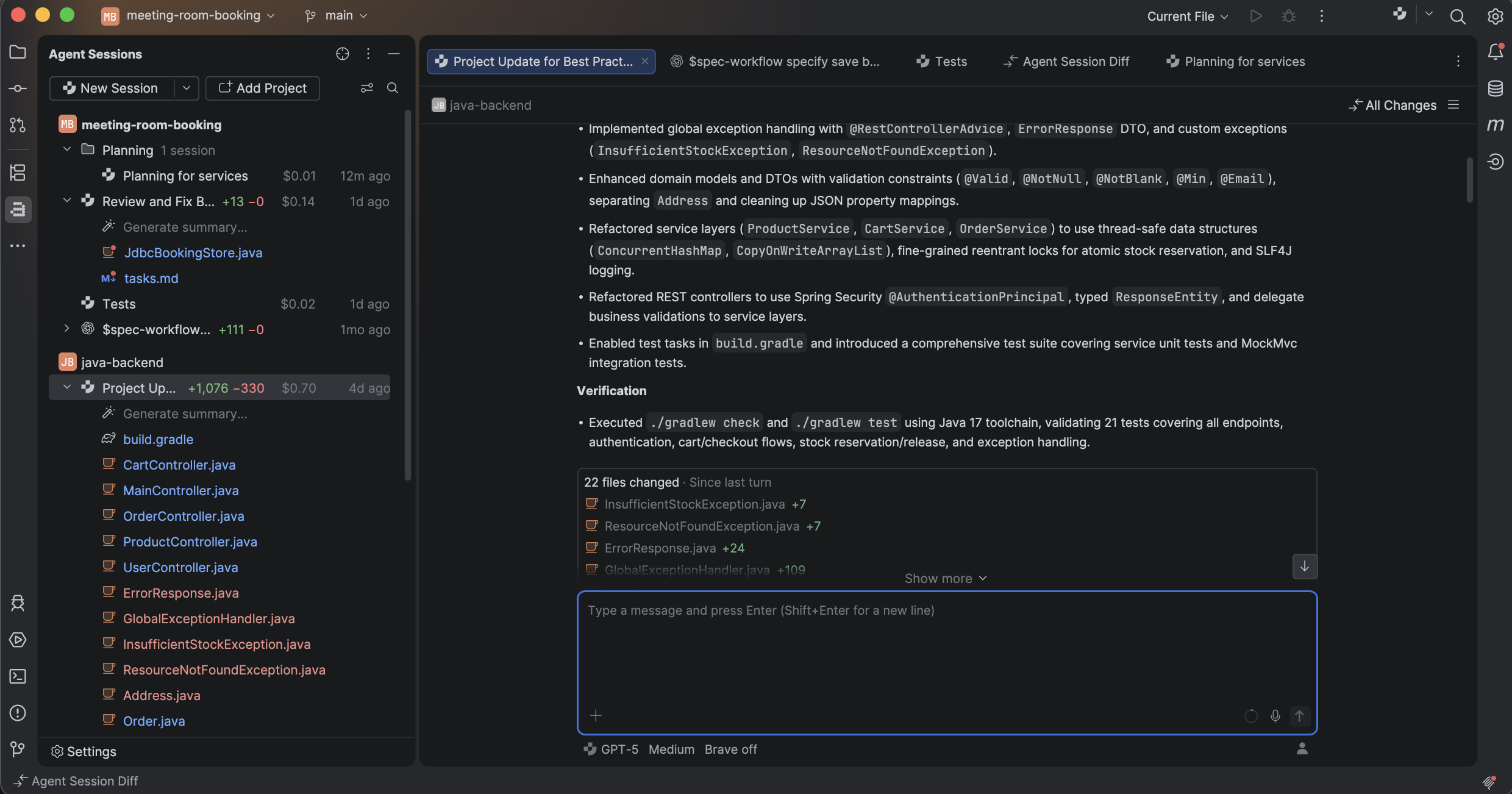
Official product screenshot from JetBrains Air. The displayed tasks, model names, costs, and verification statements belong to JetBrains’ example screen; they are not measurements from this article.
1. Start with the product boundary
“Air supports this” is often too imprecise to be useful. Ask which Air surface, which agent, which account, and which execution environment.
| Component | What it contributes | What to check before adoption |
|---|---|---|
| Air in IDEs | An agent workspace within JetBrains IDEs | IDE/plugin version, supported agent interface, authentication |
| Air app | A separate application for task-oriented agent work | Local, worktree, or Docker workflow and its configuration |
| Air Teams | Shared cloud tasks, environments, and team workflows | Organization access, repository permissions, supported cloud setup |
| Air Context | Semantic repository retrieval | Indexing eligibility, data handling, repository/revision coverage |
| Air Governance | Organization-level AI access, policies, spend, and analytics | Plan-specific controls and the traffic those controls actually cover |
| Air Gateway | The command-line entry in the current Air product family | Current setup and supported integrations; do not assume historical CLI instructions are unchanged |
These are separate adoption decisions, not a mandatory installation sequence. The official Air overview, Air Teams documentation, Air Context page, and Air Governance page describe their respective scopes.
Air in IDEs is a plugin, not an independent model provider. It can use existing local agents and supported account configurations. AI Assistant remains a separate plugin with overlapping agent capabilities as well as chat, completion, and other editor assistance. Junie is an agent; it is not another name for Air. See the Air in IDEs overview and AI Assistant comparison.
The October EAP announcement describes plugin installation through Marketplace and availability in 2026.3 EAP builds. The cloud-agent announcement scopes current cloud access to organizational users, with broader individual availability planned. Treat those as dated availability statements, not permanent product properties.
This is also why the September article remains useful as an architectural discussion but should not be used as a current installation guide. Product names and packaging have moved; the questions about context, execution, and evidence still apply.
2. The unit of work changes from an edit to a task
In an interactive IDE workflow, I usually know which file I am editing and can inspect each change as I make it. With delegated work, I may receive a patch across six files after the agent has explored the repository, changed an implementation, and run several commands.
That creates a larger unit of responsibility:
Task = goal + starting revision + context + allowed actions
       + execution environment + acceptance evidence + owner
This is a proposed engineering model, not an Air configuration schema. It exposes the information needed to reproduce and judge the result.
For a one-line rename, that structure can be lightweight. For a behavior change in a payment adapter, it needs to be explicit. The task should say which responses are retryable, whether requests are idempotent, how timeouts are represented, and what must remain compatible. “Make retries more robust” leaves those decisions to inference.
Air’s session management provides a place to track projects, sessions, and changes. The operational gain is being able to return from a conversation to the affected code without reconstructing the task from scattered terminal tabs. The exact actions are documented under Manage agent sessions.
A debugger and semantic refactoring tools remain valuable after delegation. If a generated fix fails only under a particular transaction boundary, inspecting the running application may be faster than adding more instructions to the conversation.
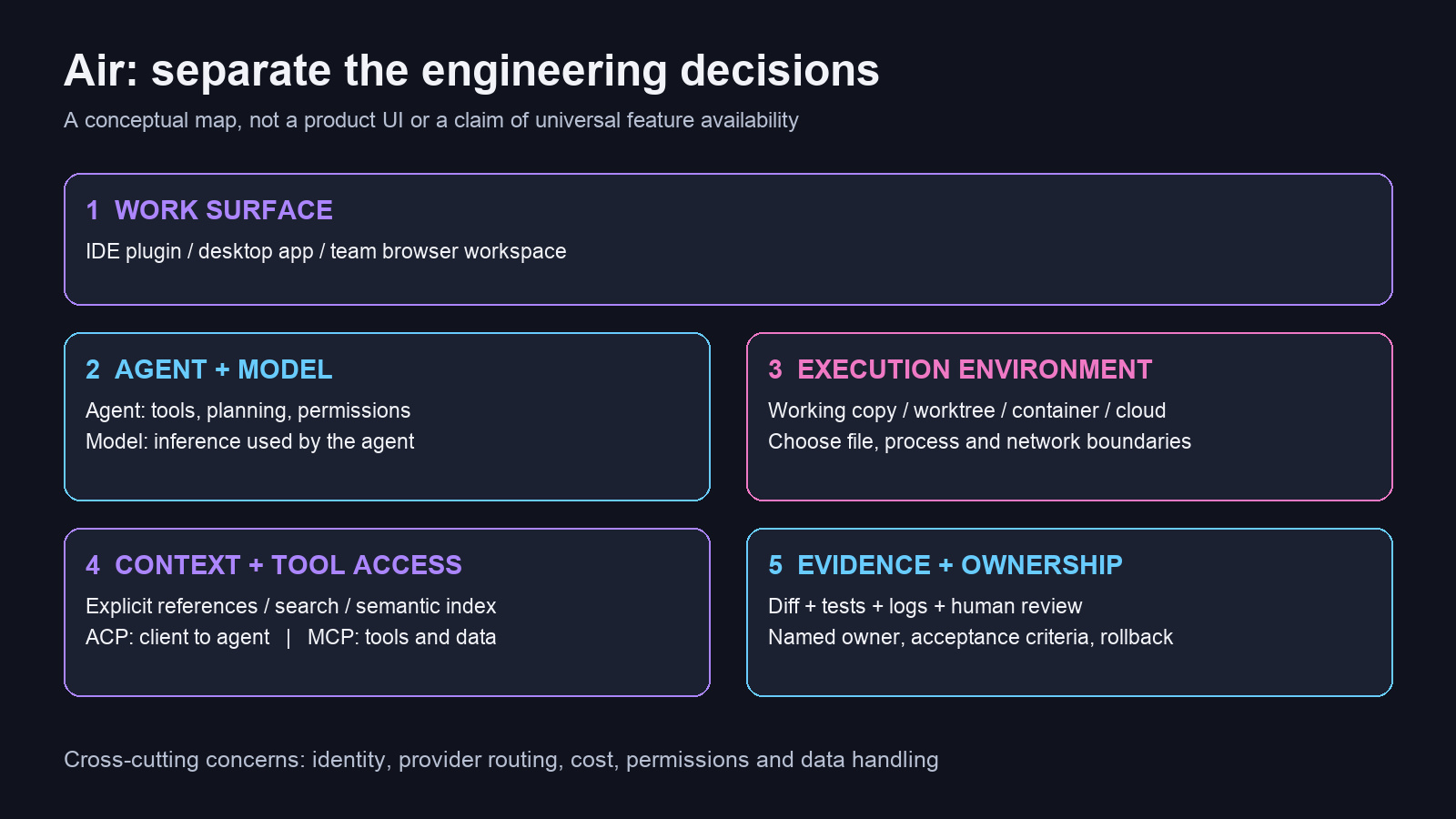
Author-created diagram. These are engineering responsibilities, not a claim that every Air surface exposes identical controls.
3. Agents, models, ACP, and MCP are different choices
A model produces responses. A coding agent adds the execution loop: instructions, tools, state, decisions about what to inspect, and mechanisms for making changes. The workspace lets the developer start, supervise, and review that work.
Changing the model within an agent is therefore different from changing the agent. Two agents using comparable models can behave differently because they retrieve context differently, expose different tools, and apply different permission defaults.
The protocol boundary matters too:
ACP means Agent Client Protocol. It standardizes communication between a client such as an IDE and a coding agent. See the ACP introduction.
MCP means Model Context Protocol. Its client/server architecture connects AI applications to tools, resources, and prompts. See the MCP architecture documentation.
A simplified arrangement looks like this:
Developer
  -> Air / IDE client
      -> ACP-compatible coding agent
          -> model provider
          -> file and terminal tools
          -> MCP client -> configured tool or data servers
Not every interaction follows this exact path. In particular, an agent running in a terminal interface is not automatically using the same integration as a structured ACP chat.
Neither protocol establishes universal account compatibility. JetBrains documents a concrete example: a Claude subscription can be used with Claude Code in the Air in IDEs terminal surface, while Claude Agent in its chat surface requires a supported alternative such as Anthropic API billing or JetBrains AI. See Use Claude subscription.
Similarly, the agent-selection documentation distinguishes adding custom ACP agents in the Air app from the organization-enabled choices in the browser. A local configuration file is not evidence that the same agent can run in the managed cloud environment.
For a pilot, record the exact combination:
Client surface: Air in IDEs
IDE and plugin version: recorded by the evaluator
Agent: selected installed agent and version
Model: exact selection used in the session
Authorization: provider account / API billing / JetBrains AI
Execution: local checkout or separately configured environment
Tools: explicitly enabled integrations
This makes later results interpretable. “Air was expensive” is not a diagnosis if one trial used an API account, another consumed organizational credits, and a third spent most of its time reinstalling dependencies.
4. Worktrees separate changes; execution controls limit authority
Parallel tasks become easier when their edits do not share a working directory. Git worktrees provide that separation while remaining attached to the same repository. The Git worktree manual explains the underlying mechanism.
For example, this ordinary Git sequence creates a named branch and a separate checkout from a recorded base:
# Run in the intended repository; inspect existing local changes first.
git status --short
git fetch origin
base_commit=$(git rev-parse origin/main)
git worktree add -b agent/order-validation ../order-validation "$base_commit"
git -C ../order-validation status --short
This is an illustration of Git behavior, not a required Air setup sequence. Replace the remote and branch with your repository’s actual values.
A worktree does not, by itself, prevent a process from reading another directory, accessing credentials, opening a network connection, or modifying a shared database. Those properties depend on the agent’s effective permissions and the surrounding runtime.
| Execution choice | Separation it can provide | Questions that remain |
|---|---|---|
| Main working copy | Immediate access to the current development state | Can the agent overwrite unrelated local work? |
| Git worktree | Separate checked-out files and branch state | Are credentials, ports, services, caches, or databases shared? |
| Container | Filesystem and process boundaries, subject to configuration | What is mounted? Is the host socket exposed? What network access exists? |
| Managed cloud task | A remote task environment independent of the laptop | Which repositories, secrets, services, and egress destinations are reachable? |
The table is an engineering analysis, not a security certification. “Cloud” does not make a database credential harmless, and “container” says little without its configuration.
JetBrains describes Air cloud tasks as running a container inside a task-specific VM, with traffic routed through a configurable proxy. The same explanation covers domain allowlists and task secrets. See How Cloud-Based Agent Sandboxing Works in Air.
The practical question is the blast radius of a mistaken command. A disposable filesystem may protect the developer’s laptop, but it cannot undo an API request sent with a production credential. For a test-generation pilot, an environment that can fetch approved dependencies and use disposable test services is usually easier to reason about than one carrying the developer’s full authority.
Parallelism also has an integration cost. Two tasks can modify different files while making incompatible assumptions about the same API. I would parallelize independent investigations or changes to separate modules first, then serialize work that changes shared interfaces. More concurrent sessions are useful only while review and integration can keep up.
5. Context must include the contract, not just the implementation
There are three useful sources of context:
Explicit references: the files, symbols, failures, examples, and requirements provided with the task.
Exploration: the agent’s own searches and inspection of surrounding code.
Indexed retrieval: a repository service that helps locate relevant implementation knowledge.
The Air app’s task-context documentation describes attaching files, symbols, Git information, and terminal context. Air Context adds semantic indexing and retrieval, with early-access conditions described separately from the workspace itself.
The engineering benefit of retrieval is avoiding repeated discovery. If every task spends twenty tool calls finding the same error handler and authorization convention, a better retrieval path can reduce that overhead. Whether it does so in your codebase is an empirical question; vendor-reported savings should not become your budget assumptions without measurement.
The highest-value context is often outside the function being edited. For an HTTP endpoint, it may include:
the request schema and examples used by clients;
the application’s exception-to-response mapping;
the authorization convention;
the relevant test fixtures;
the downstream service contract;
the reason a previous implementation was rejected.
An index can locate existing code. It cannot infer an undocumented product decision with certainty.
Keep retrieval freshness in the acceptance process as well. If an agent references a symbol from another branch or repository, confirm that the recommendation applies to the target revision. A plausible example from a different release can be more misleading than no example at all.
There is also a separate data-flow decision. JetBrains’ Context documentation describes cloud indexing, stored embeddings and location metadata, and deletion controls. The claim that raw source is not retained as raw source is not equivalent to saying no source content is processed remotely. Evaluate indexing independently from where the agent executes.
6. A concrete task: validate an order request in Spring Boot
The presentation includes a small Java improvement. That is a good pilot because the behavior can be bounded and the failure cases can be written down before an agent changes code.
Assume an existing Spring MVC endpoint accepts this request:
{
  "sku": "BOOK-001",
  "quantity": 2
}
The requirement is to reject missing or blank SKUs and quantities outside 1–100. Valid orders must keep the existing response contract. Invalid input must not reach the order service.
Define the task before choosing the agent
Here is an original example brief that can be adapted to a real repository:
Goal
Add request validation to POST /orders.

Behavior
- sku must be non-null and contain a non-whitespace character.
- quantity must be non-null and between 1 and 100 inclusive.
- Invalid requests return HTTP 400 using the existing error contract.
- Invalid requests must not call OrderService.create.
- Valid requests preserve the existing response body and status.

Scope
Inspect OrderController, CreateOrderRequest, the exception advice,
and the existing controller tests before proposing changes.
Do not change authentication, persistence, public field names,
dependency versions, or unrelated formatting.

Evidence
Add regression and boundary tests. Run the relevant suite and the
repository's normal verification command. Report exact commands,
results, skipped checks, and any pre-existing failures separately.

Stop condition
If the requested behavior conflicts with a documented client contract,
explain the conflict before implementing a different contract.
This brief deliberately defines observable behavior rather than prescribing every line of code. An agent may find that the repository already has an appropriate validation pattern. Reusing it is usually preferable to introducing a second error-handling convention.
Review the proposed implementation at the boundary
A possible request type is:
import jakarta.validation.constraints.Max;
import jakarta.validation.constraints.Min;
import jakarta.validation.constraints.NotBlank;
import jakarta.validation.constraints.NotNull;

public record CreateOrderRequest(
    @NotBlank String sku,
    @NotNull @Min(1) @Max(100) Integer quantity
) {}
The controller must actually trigger validation:
@PostMapping("/orders")
public ResponseEntity<OrderResponse> create(
        @Valid @RequestBody CreateOrderRequest request) {
    return ResponseEntity.status(HttpStatus.CREATED)
        .body(orderService.create(request));
}
These are illustrative excerpts for a Jakarta Validation-based Spring application. They assume an existing OrderService, OrderResponse, controller imports, and a configured validation provider. They are not a complete application and have not been executed as a sample project for this article.
The distinction matters. Adding annotations to a DTO does not prove the HTTP boundary enforces them. Spring documents how @Valid works with @RequestBody and how validation failures normally become HTTP 400 responses in its request-body reference. An application’s exception advice can still change the response body or handling behavior.
Using Integer makes an absent or explicit-null quantity representable at the Java boundary; @NotNull expresses that requirement separately from the numeric bounds. Also decide whether the SKU is merely checked or normalized. Accepting " BOOK-001 " while preserving its whitespace is a different contract from trimming it.
Test the contract independently
A useful test matrix is small enough for a human to inspect:
| Input | Expected outcome | Why it matters |
|---|---|---|
"sku": "BOOK-001", "quantity": 1 |
Existing success response | Lower inclusive boundary |
"sku": "BOOK-001", "quantity": 100 |
Existing success response | Upper inclusive boundary |
Quantity 0 or 101 |
HTTP 400; no service call | Adjacent invalid boundaries |
| Missing or null quantity | HTTP 400; no service call | Required-field behavior |
| Missing, null, empty, or whitespace-only SKU | HTTP 400; no service call | Distinguishes several invalid inputs |
| Malformed JSON | Existing HTTP 400 error behavior | Deserialization precedes validation |
| Valid request under existing authorization rules | Unchanged behavior | Prevents an unrelated access regression |
An illustrative MockMvc test body could include:
mockMvc.perform(post("/orders")
        .contentType(MediaType.APPLICATION_JSON)
        .content("""
            {"sku":"BOOK-001","quantity":0}
            """))
    .andExpect(status().isBadRequest());

verifyNoInteractions(orderService);
Adapt authentication and CSRF setup to the application. Otherwise, a request rejected by the security layer can make a validation test meaningless. Assert the expected validation error response as well, using the application’s actual schema.
The strongest regression check is to observe the new test fail for the intended reason against the old implementation, then pass with the fix. A suite that was already green tells you much less. Do that comparison in a disposable test checkout if reverting the implementation would disturb ongoing work.
This is where an engineering-oriented article has to go beyond a screenshot saying “tests passed.” Which tests? Against which revision? Did they assert the business contract, or only reproduce the generated implementation?
7. Review should produce evidence, not another confident summary
Air in IDEs supports generating a change summary in a separate agent session and attaching notes to diff lines. There are UI-specific limitations: the documentation says a diff opened from the changed-file list in session chat is read-only and does not accept notes; other entry points support them. See Review changes with AI.
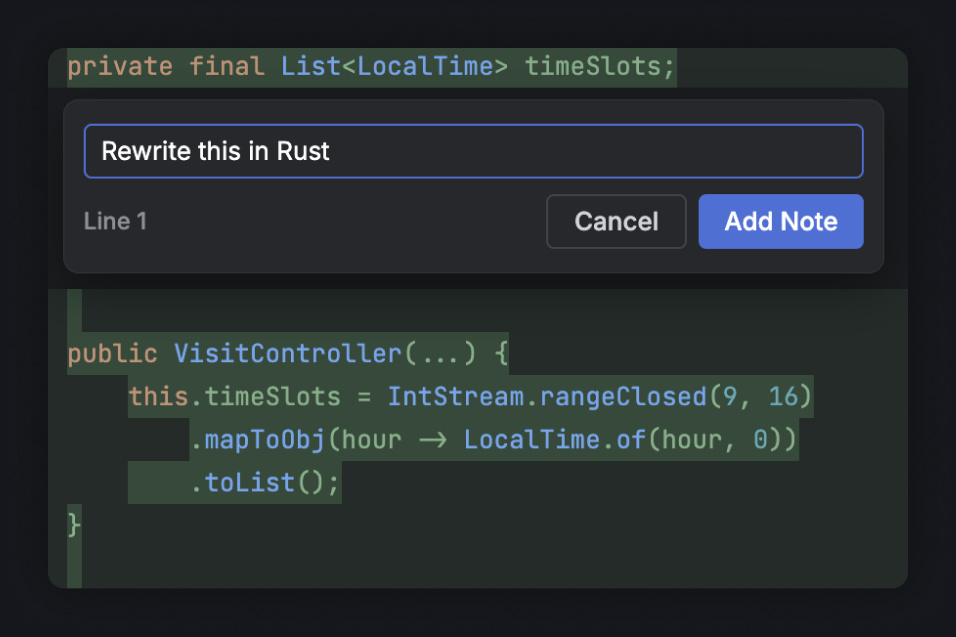
Official JetBrains Air image illustrating line-level feedback. The sample instruction shown in the image is a UI example, not a recommendation for this Java task.
A useful review comment is specific about the violated contract:
The new test verifies HTTP 400, but it does not show that the order
service was never called. Add that assertion. Also include quantity=100
as a successful boundary case and preserve the existing error schema.
That comment gives the agent a concrete correction and gives the next reviewer something observable to check.
A second agent can help identify omissions, but independence needs more than a different product name. Give the reviewer the original requirement, the base revision, and the actual diff. Ask it to find counterexamples rather than merely summarize the implementation author’s explanation.
For the order example, I would ask:
Review only; do not change files.
Compare this patch with the original request contract.
Look for missing boundary cases, altered success responses,
validation bypasses, and tests that pass for the wrong reason.
For each finding, identify the affected code and a reproducing input.
Separate confirmed defects from questions requiring product decisions.
Even two agents may share the same mistaken assumption. Human ownership remains necessary for decisions such as whether blank values should be rejected, whether an API change is compatible, and whether a rollout needs coordination with clients.
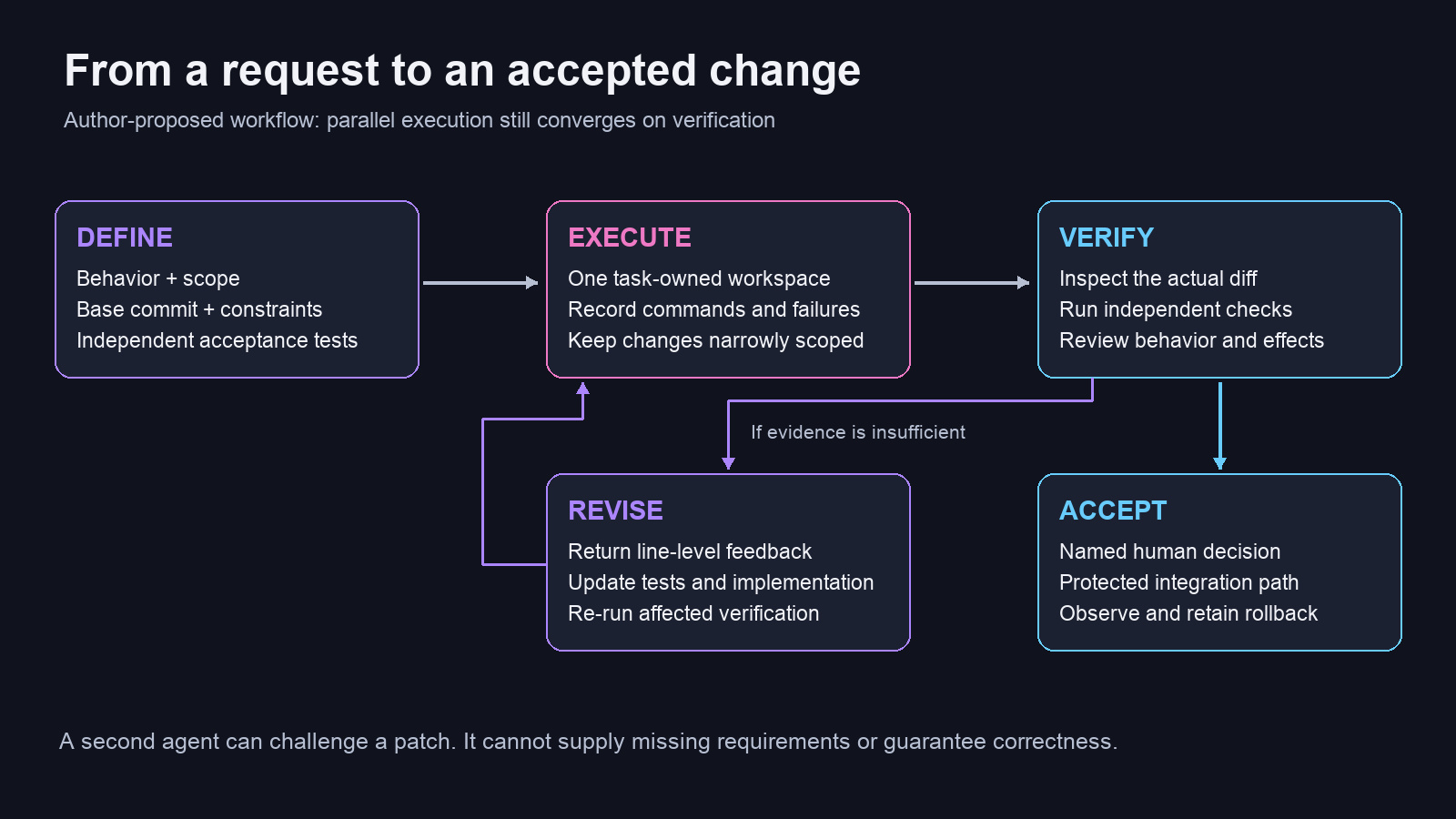
Author-created workflow. Verification is repeatable; acceptance is an explicit decision.
A compact result record is more useful than a long victory message:
Base revision: <commit>
Result revision or saved patch: <identifier>
Changed behavior: <observable difference>
Commands run: <commands and exit status>
Evidence: <test reports and relevant logs>
Not run: <checks and reasons>
Remaining decisions: <owner and question>
For uncommitted changes, the commit alone is insufficient: preserve the patch or another stable representation of the reviewed state. If the code changes after review, the previous evidence may no longer describe what will be merged.
8. Air Teams makes the environment a shared engineering asset
Local agent work often depends on accidental infrastructure: a developer’s installed JDK, a package-manager cache, a private registry login, or a database left running yesterday.
Air Teams moves tasks into shared cloud configurations and produces work on task branches, with a person responsible for the pull-request path. Its overview describes the environment and project model. That makes repeatable setup a first-class team concern.
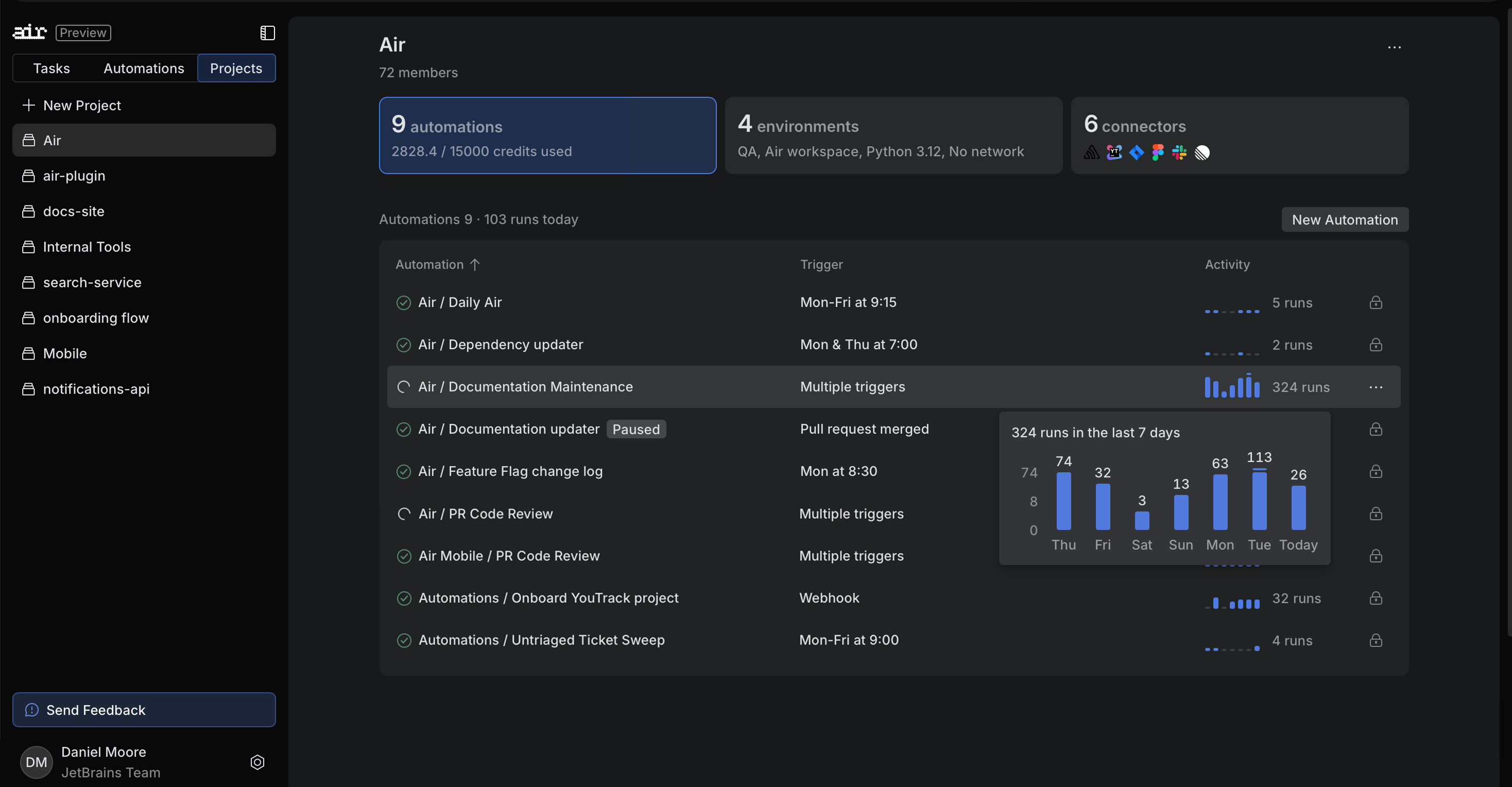
Official product image from JetBrains Air. Dashboard values are illustrative product content, not evidence of task quality or throughput.
One limitation deserves explicit attention: current cloud image documentation says cloud environments use the managed default image, custom Docker images are not yet supported, and .air/docker.json does not configure cloud environments. Do not assume a Docker setup that works in the local app transfers unchanged to Air Teams.
Before adding an agent, prove that a fresh environment can run the project’s normal checks. For a Java service, that means identifying the required JDK, using the repository’s build wrapper, accessing approved artifact repositories, and provisioning the test dependencies. A tool that can edit Java but cannot reproduce the build has limited value for changes that depend on runtime behavior.
Treat setup failures as a separate category during evaluation. If six out of ten tasks cannot fetch a private dependency, that is an environment-readiness result. It is not evidence that the selected model cannot solve the coding task.
Automate a proven task, then control its repetition
Air Teams automations support recurring or event-driven work. The useful progression is to stabilize a manual task before scheduling it.
For example, a documentation-checking automation needs more than “keep docs current.” My proposed operating contract would specify:
Trigger: a merge that changes a public API directory.
Scope: compare the merged change with the relevant documentation.
Output: one proposed documentation patch, or an explicit no-change result.
Deduplication: identify the input commit and avoid opening equivalent work twice.
Authority: documentation edits only; no release or production action.
Owner: a team or service account with a named human maintainer.
Limits: a run budget, concurrency limit, and failure escalation rule.
These are design requirements to implement and verify, not a claim that every safeguard is a built-in toggle. The hard part of automation is often deciding when a repeated action is still useful.
9. Compare complete workflows, not product stereotypes
The market has moved beyond “AI editor versus terminal agent.” Several products now offer multiple interfaces, parallel work, and remote execution. A fair comparison must name the surface being evaluated.
| Product or setup | Documented capability relevant to this comparison | When I would include it in a pilot |
|---|---|---|
| Air in IDEs + optional Air Teams | Agent work inside JetBrains IDEs, plus a distinct team cloud environment | Existing JetBrains users evaluating integrated review and shared execution |
| Cursor Agent / Agents Window / cloud workflows | Agent tools, separate worktrees, and cloud-agent environments | Teams willing to evaluate Cursor’s work surface and its task-management workflow |
| Windsurf-origin Cascade, currently documented under Devin Desktop | Editor-integrated Code/Chat modes, tools, checkpoints, and a broader agent environment | Teams evaluating that editor experience; check current product naming and plugin lifecycle |
| GitHub Copilot in the IDE + cloud agent | In-IDE agent work and cloud-agent session access from supported IDEs | Teams whose issue, CI, and review workflow already centers on GitHub |
| Claude Code | Terminal, IDE, desktop, and browser surfaces | Teams evaluating Claude Code’s tooling and configuration across their preferred interfaces |
| OpenAI Codex | Worktree-based parallel development and a separate cloud-task environment | Teams evaluating Codex task execution, review, and local/cloud handoff |
The relevant primary sources are Cursor Agent, Cursor worktrees, Cursor cloud builds, Cascade documentation, GitHub Copilot agents, Claude Code’s overview, Codex worktrees, and Codex Cloud.
The Windsurf documentation URL redirected to Devin Desktop documentation when checked for this article. That is worth stating explicitly instead of treating old product and extension names as interchangeable with the current offering.
My interpretation is that Air’s strongest reason to enter a shortlist is the combination of existing JetBrains development habits and agent-oriented work. That is a hypothesis to evaluate, not proof of superior output. A team already satisfied with another tool’s review loop may gain little from switching.
Agent choice can also be complementary. Running Codex through an Air surface and using Codex’s own application are two different workspace choices around related agent capabilities. The same distinction applies to an integrated Claude agent and Claude Code’s native surfaces. Compare the actual experience, permissions, and billing path rather than forcing every name into a mutually exclusive category.
Use the same task contract in every trial
For each candidate, hold the requirements, base revision, acceptance checks, and time budget as constant as practical. Record model and environment differences rather than hiding them.
Ask the engineer to perform the same observable sequence: start the task, recover from an environment failure, inspect the diff, request a revision, run independent checks, and retain or reject the result. That exposes friction a feature table cannot capture.
A tool can support parallel tasks and still make the final integration awkward. Another can expose fewer controls while fitting a team’s narrow workload better. The relevant outcome is accepted work with an understood cost.
10. Count review effort and rejected attempts in the economics
Air’s authentication and billing options differ by surface. The Air Teams credits documentation says cloud tasks and automation runs use JetBrains AI credits, while local app tasks can use other provider accounts. A local provider connection should therefore not be assumed to carry over to the cloud.
Air Governance separately describes organizational controls and plans. Governance, model consumption, and infrastructure should be evaluated as distinct cost categories, with current contractual terms checked for the intended setup.
For a pilot, I would use this accounting model:
Cost per accepted task =
  (agent/model consumption across all attempts
   + allocated platform and environment costs
   + human setup, supervision, review, and rework cost)
  / number of accepted tasks
This is a proposed decision metric, not a JetBrains billing formula. Include abandoned attempts in the numerator. If no task is accepted, report that outcome directly instead of presenting an undefined ratio as a useful price.
For illustration only, suppose a change previously required 60 minutes of human work. With an agent it requires 10 minutes to specify, 15 to review, and 20 to repair. The human saving is 15 minutes, even if the initial patch appeared in two minutes. Whether that is worthwhile depends on tool cost, quality, and the kind of work the engineer can do while the task runs.
The same principle applies to throughput. If agents generate ten patches a day but reviewers can safely accept three, increasing generation may simply lengthen the queue. Measure waiting time and review effort before increasing concurrency.
Cost telemetry also needs an evidence boundary. A usage dashboard can explain consumption; it cannot establish that a patch met its requirements. Join task identity, revision, CI evidence, and human acceptance when evaluating results.
11. A small pilot that can produce a real decision
Choose one repository with a reproducible build and a maintainer willing to review the results. Start with bounded changes: a known bug with a reproducer, missing boundary tests, a documented API adjustment, or a narrowly scoped refactoring.
Avoid making the first experiment an ambiguous architectural rewrite. A failure would be hard to interpret, and a successful-looking result would be expensive to validate.
A practical pilot can proceed in four stages:
| Stage | Work | Exit evidence |
|---|---|---|
| Baseline | Complete representative tasks with the existing workflow | Human effort, review effort, defects, and environment failures recorded |
| Local trial | Delegate comparable bounded tasks through the selected Air setup | Reproducible runs and reviewable diffs with explicit acceptance checks |
| Shared execution | Repeat suitable tasks in Air Teams, if available | Fresh environments can run the checks; permissions and costs are understood |
| Decision | Compare accepted outcomes and recurring failure modes | Expand, narrow the use case, repair infrastructure, or stop |
Use several tasks rather than a single polished demonstration. Do not rerun the exact same task repeatedly without accounting for learning and caching effects. A small matched set is useful for discovery, but it is not a statistically definitive benchmark.
Record at least task success, human minutes, review/rework minutes, consumed budget, setup failures, and escaped defects. Classify failures: missing requirement, retrieval error, environment problem, incorrect implementation, or integration conflict. Different failure classes need different remedies.
Define the fallback before the trial begins. Preserve normal IDE operation, ordinary branches and pull requests, and the existing CI path. If you stop using an agent integration, keep useful commits and documentation, disable its automations, and remove credentials or environment access that no longer serve a purpose. Generated changes should remain maintainable without the product that created them.
12. What Air is worth evaluating for
Air is most interesting where the expensive part of AI-assisted development has become coordinating work: supplying the right context, maintaining usable environments, tracking several tasks, and reviewing their changes in the codebase’s actual structure.
Its features can reduce that coordination burden. They cannot determine an undocumented requirement, make a shared credential safe, or turn an incomplete test suite into proof of correctness.
My criterion for adoption is straightforward: does this setup help the team produce more accepted, maintainable changes with less total effort and an understood execution boundary?
The way to answer is to follow a real task all the way through. Define the behavior. Choose the agent and environment. Preserve the evidence. Review the change. Measure the work that remained.
That is where an agentic development environment becomes useful engineering infrastructure.